> ## Documentation Index
> Fetch the complete documentation index at: https://docsy3.mile.app/llms.txt
> Use this file to discover all available pages before exploring further.

# Manage Schedule

## View Schedule

<Note>
  Required permission:

  * View schedule
</Note>

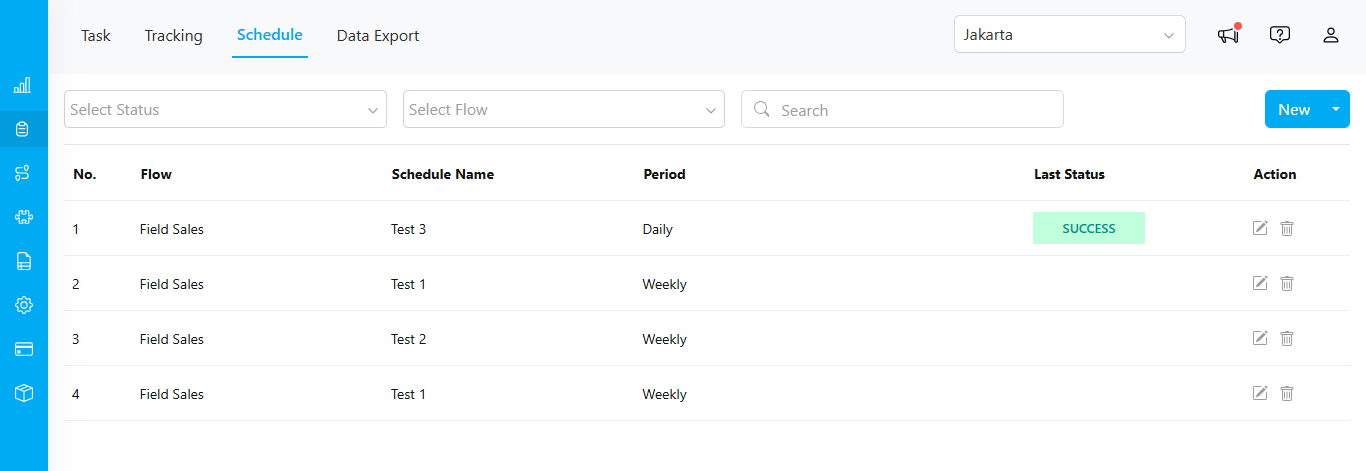
Once you have successfully created a schedule, it will appear in the table below.

<div align="center">
  <img src="https://mintcdn.com/mile-app/M1z_0MOHQdp8jD9l/images/task/schedule/manage-schedule-01.png?fit=max&auto=format&n=M1z_0MOHQdp8jD9l&q=85&s=1cbcdb17ebd37d123922420c75c20dbe" alt="image" width="600" data-path="images/task/schedule/manage-schedule-01.png" />
</div>

The table includes the following columns:

* **Flow**: Displays the task flow name.
* **Schedule Name**: Shows the name of the schedule.
* **Period**: Indicates the schedule cycle, such as "Daily."
* **Last Status**: Shows the status of the last run. If the status is "SUCCESS," you can hover over it to see the complete date and time in a tooltip.

<div align="center">
  <img src="https://mintcdn.com/mile-app/M1z_0MOHQdp8jD9l/images/task/schedule/manage-schedule-02.png?fit=max&auto=format&n=M1z_0MOHQdp8jD9l&q=85&s=25d2455d710288b2b98a23e4876f2092" alt="image" width="600" data-path="images/task/schedule/manage-schedule-02.png" />
</div>

\*   **Action**: Allows you to edit or delete the schedule.

## Edit

<Note>
  Required permission:

  * View schedule
  * Edit schedule
</Note>

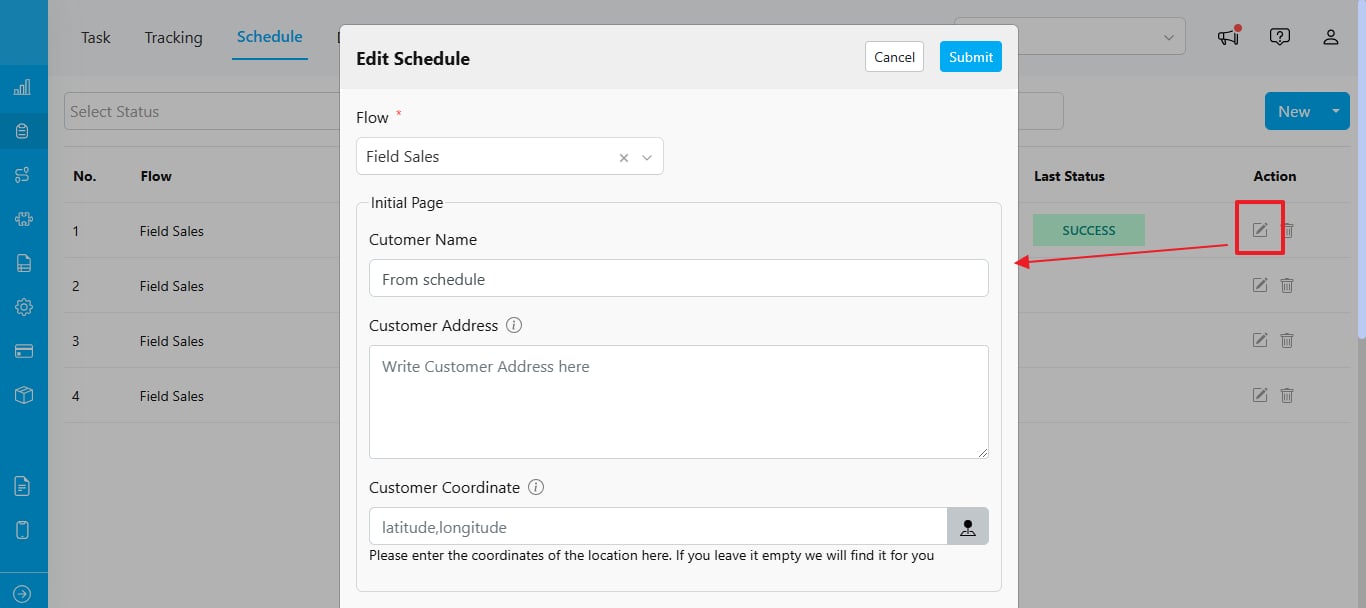
To edit a schedule, click the pencil icon in the Action column.

<div align="center">
  <img src="https://mintcdn.com/mile-app/M1z_0MOHQdp8jD9l/images/task/schedule/manage-schedule-03.png?fit=max&auto=format&n=M1z_0MOHQdp8jD9l&q=85&s=3b3e64259c28376729d6ad9f8ca86326" alt="image" width="600" data-path="images/task/schedule/manage-schedule-03.png" />
</div>

## Delete

<Note>
  Required permission:

  * View schedule
  * Delete schedule
</Note>

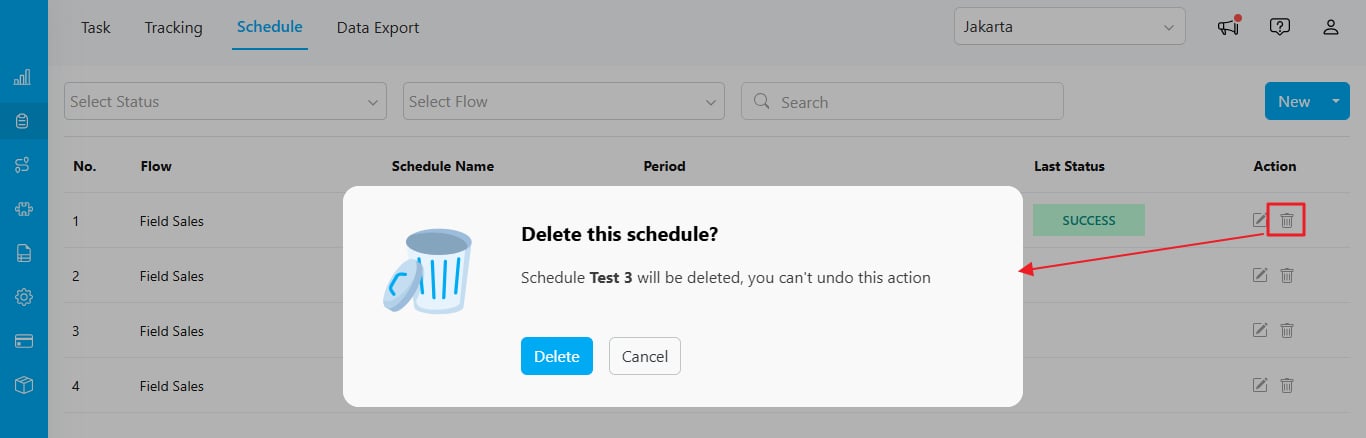
To delete a schedule, click the trash icon in the Action column. When the confirmation dialog appears, select "Delete."

<div align="center">
  <img src="https://mintcdn.com/mile-app/M1z_0MOHQdp8jD9l/images/task/schedule/manage-schedule-04.png?fit=max&auto=format&n=M1z_0MOHQdp8jD9l&q=85&s=54896c327b6863159c3f4a1c641499dd" alt="image" width="600" data-path="images/task/schedule/manage-schedule-04.png" />
</div>


This documentation is built and hosted on [Mintlify](https://mintlify.com), a developer documentation platform.